Your lesson is only as good as the audio it arrives on

ChalkLine is a small publication about one narrow thing: the software side of sounding clear when you teach online. Tutors on marketplace platforms, teachers running classes from kitchen tables, webinar hosts carrying ninety minutes solo — this is for you. No microphone reviews, no studio-building, no invented lab tests. Just the settings, tools and habits that decide whether students understand you the first time.
Why a whole site for this
Because teaching audio fails differently. A meeting survives a barking dog; a trial lesson doesn't. Your students are decoding a second language, or they're nine years old, or they paid for a webinar seat and will judge the replay coldly. You also talk more than anyone in any meeting ever does — which means every hum, echo and household sound sits underneath hours of your instruction, not minutes.
Generic call-audio advice keeps recommending gear and generic app settings. We think the honest order is different: first the platform's own machinery, then one good software layer, and only then anything that costs real money. Sometimes the right answer is free and we say so — nobody pays us for the paragraph that tells you to stop spending.
The shelf, in teaching order
The Guide
Noise cancellation for online teaching, end to end: what's built in, what Krisp adds, the free heavyweight, and a computed teaching-fit table. Read this one first.

Teaching from home
Kids, flatmates, thin walls and the after-school hour. A noise audit for real households, plus what software can and cannot absorb for you.
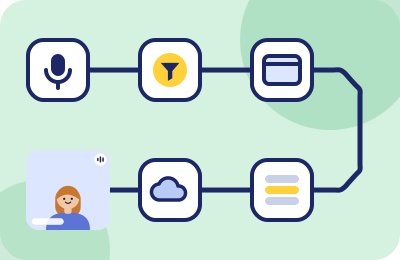
Tutor audio setup
The five-layer chain between your voice and your student's ears — browser permissions, device pickers, OS levels, suppression — in the order that avoids surprises.
Webinar host audio
Carrying a room solo in Livestorm, Demio and friends: pre-flight checks, guest speaker audio, and why replays punish noise harder than live rooms do.
Lesson recordings
When your live class becomes a file — italki recordings, webinar replays — noise stops being a moment and becomes permanent. What to do about that, before you press record.
Krisp, for teachers
The dedicated write-up of the tool we recommend most: lesson-day mechanics, verified pricing, and the honest list of things it won't fix.
Platform notes
Teaching platforms run their own classrooms with their own device checks, quirks and rules — and their audio problems deserve platform-specific answers, not another generic settings tour.
 Preply classroom audio — the browser classroom, its connection test, and where a suppression layer plugs in.
 italki classroom audio — the pre-lesson device check, recording consent mechanics, and browser support.
 Outschool class audio — classes run on Zoom, but your actual problem is eight unmuted nine-year-olds. A classroom-management answer.
How we work. Vendor prices and platform features on this site carry the date we last checked them against the vendor's own pages (current pass: 2026-09-20). Scores come from a script that ships with the site, not from vibes. Affiliate links are disclosed where they appear — and at least one of our standing recommendations pays us nothing at all. The fine print lives in the Classroom Rules; the people and method, on the about page.
Where to start, by situation
- "My trial lessons aren't converting and I suspect the noise." Read the Guide top to bottom, then run the ten-minute setup at the end of it. Record the before and after; the recordings will settle the suspicion either way.
- "My audio is fine except when my family is home." That's the speech-like noise problem, and it has a specific fix. Start with the three-bin audit, then the Krisp trial against your loudest week.
- "A student said I sounded robotic / far away / underwater." Three different words, three different faults: robotic is your connection, far away is the wrong microphone selected, underwater is stacked filters. The setup chain walks the diagnosis in order.
- "I'm hosting my first big webinar next month." The host playbook, especially the T-minus-30 pre-flight and the guest-speaker brief — send that brief with the calendar invite, thank us later.
- "My platform's classroom is misbehaving." Go straight to the note for Preply, italki or Outschool — each one is built on that platform's own documentation, checked and dated.
- "I record my lessons and the files sound worse than the live hours felt." They always do. The recording guide explains why, and what to change before the next file.
From the column
After the Bell is our margin-notes column — short entries written between lessons, where the noise problems are specific and the solutions occasionally undignified. Recent entries: the semester a construction crew moved in next door, why beginners hear noise differently than your C1 students, and what a webinar replay taught us about live adrenaline.